 SuperappSuperapp
Convert Figma to
a native iOS app
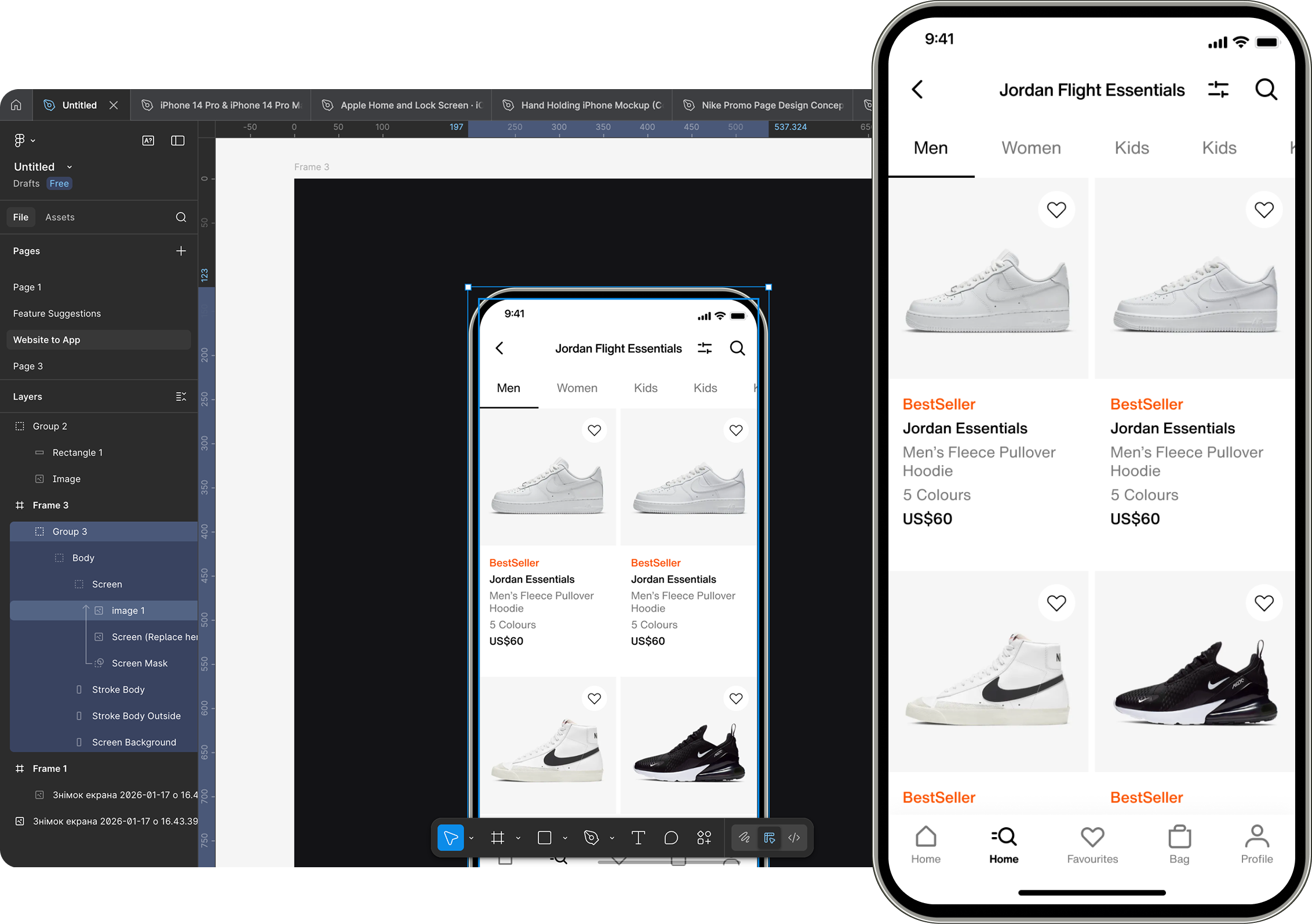
Connect your Figma account, paste a link to your screen, and Superapp builds a real native iOS app in SwiftUI, a complete Xcode project you own.
Free to start • No credit card required • Works in your browser
The most advanced no-code AI app builder for iOS. Superior in design. Every Apple platform: iPhone, iPad, Watch, and Mac apps.If your device can do it, Superapp can build it — 3D games, AR, body tracking, Live Activities, Siri intents, widgets, and more.The first and best Swift app builder. Install on your iPhone with one click. Two clicks to App Store.
Why go native?
From Figma to a
native iOS app.
Click the Figma icon in Superapp, connect your Figma account, and paste a link to the screen you want. Describe how it should behave, and AI builds real Swift screens and navigation ready for the App Store.
Figma to SwiftUI
Connect your Figma account and paste a screen link. Superapp reads it directly and generates native SwiftUI screens, real Swift you can open in Xcode.
Real device features
Turn static prototypes into apps with camera access, haptics, and push notifications.
App Store ready
Generate code that follows Apple guidelines and submit confidently without rebuilds.
From design to app fast
Skip handoff delays. Go from Figma file to a working iOS app in hours.
How it works
Four steps to your app.
Connect your Figma account
Click the Figma icon in Superapp and sign in to connect your account.
Paste the screen link
Copy the link to your Figma frame and paste it into Superapp as a reference.
Describe behavior
Tell the AI how the screen should work, what data it needs, and the flow you want.
Export the Xcode project and ship to the App Store
Export your project, follow our guide, and publish to millions of iPhone users.
How much does it cost to turn a Figma design into an app?Hiring a developer to build your Figma design natively typically costs $10,000–$50,000, the same as any custom app build. With Superapp, it starts free — 5 credits every day, and Pro is $25 a month.Publishing needs an Apple Developer account, $99 a year. Most conversions finish in a single session, hours rather than months, for less than an hour of agency time.
Figma to code vs. Figma to native SwiftUI
Most Figma-to-code tools output HTML, React, or a component snippet you still have to assemble. Superapp goes further: it turns your Figma screens into a complete, working native iOS app in Swift, not just code fragments.
| Approach | Output | Result |
|---|---|---|
| Figma Dev Mode / code plugins (Anima, Locofy) | HTML, CSS, React snippets | Code fragments a developer assembles |
| Figma Make | A web app or prototype | Web, not a native iPhone app |
| Superapp | Native SwiftUI, full Xcode project | A real iOS app you ship to the App Store |
Frequently asked questions
Looking for something else? See what Superapp can build on the features page, or turn a website into an app on the website to app page.
How much does it cost to turn my Figma design into an app?+
From free. Superapp gives you 5 credits every day, and Pro is $25/month — versus $10,000–$50,000 to hire a developer for a custom build. Publishing requires Apple's $99/year Developer account.
Is the result a real native app or just a clickable prototype?+
A real native app. Superapp uses your connected Figma screen as a visual reference and generates native Swift and SwiftUI, with real navigation, data, and device features, not a Figma prototype with clickable hotspots.
Do I need a Mac to convert my Figma design into an iOS app?+
No. Superapp runs in the browser and builds in the cloud, so you can go from Figma to a published App Store app on Windows or a Chromebook.
Is this the same as Figma Dev Mode or Figma-to-code plugins?+
No. Figma Dev Mode and most Figma-to-code plugins generate CSS, HTML, or component snippets for developers to wire up themselves. Superapp builds the whole app instead: real native Swift and SwiftUI screens with working navigation and logic, not code snippets you still have to assemble.
How is Superapp different from Anima or Locofy?+
Anima and Locofy convert Figma designs into React, HTML, or React Native code — web technologies, not native Swift. Superapp connects to your Figma account and generates original native Swift and SwiftUI from the screen you link, so the result is a real native iOS app, not React running in a bridge.
How is Superapp different from Builder.io or TeleportHQ?+
Builder.io and TeleportHQ turn Figma designs into web code, React, Vue, or similar, for websites, not native mobile apps. Superapp is built specifically for native iOS: it reads your Figma screen and writes real Swift and SwiftUI, not a web page.
Will Apple reject an app made from a Figma design?+
Apple's Guideline 4.2 (Minimum Functionality) targets apps that are little more than a thin wrapper or a single static screen. Because Superapp builds a full native Swift app with real navigation and functionality, not just the visuals from Figma, that specific rejection risk goes away, though final approval is always subject to Apple's review of your finished app.
Can I import multiple Figma screens at once?+
Yes. Link multiple Figma screens or frames from your connected account, and Superapp uses all of them together to build the app's full flow and navigation, not just a single screen.
Can I convert my Figma design into an Android app too?+
No. Superapp is focused on the Apple ecosystem, so it builds iOS, iPadOS, watchOS, and macOS apps, not Android. If you need both platforms from one project, a cross-platform builder is a better fit; if the iPhone is your priority, Superapp's native Swift output is built for that.
How long does it take to convert a Figma design into an app?+
Most conversions go from your connected Figma screens to a working native app in a single session, hours, not months. The exact time depends on how many screens you link, since Superapp generates roughly one screen per credit.
Does Superapp turn Figma into SwiftUI code?+
Yes. Superapp uses your connected Figma screen as a reference and generates native SwiftUI, real Swift in a complete Xcode project, not a web export or a code snippet. You own the code and can extend it in Xcode.
Can I convert my Figma design into Swift or an Xcode project?+
Yes. The output is native Swift as a standard Xcode project you own and can open, edit, and ship. There is no lock-in, an iOS developer can continue from the generated code.
Is Superapp a Figma plugin?+
No. Superapp is not a Figma plugin, you don't install anything inside Figma. Instead, click the Figma icon in Superapp, connect your Figma account, and paste a link to the screen you want. Superapp reads it directly, no manual PNG export required, then describes and builds the native app from it.
How is Superapp different from Figma Make?+
Figma Make generates web apps and prototypes. Superapp generates a native iOS app in Swift that you publish to the App Store. If you want a real iPhone app rather than a web result, Superapp is the native route.